Filming Night Games
Last verified: 2026-07-28
Most high school football is played under lights. While daytime filming forces you to confront shadows and glare, night time filming brings a new set of challenges. Understanding, technically, how a camera works under stadium lights and knowing what to look for in bad film is the key to optimizing your night time filming setup.
About this Guide
While this guide is useful for anyone filming sports at night, it's tailored towards creating scout film. Scout film may be different from broadcast footage in two meaningful ways:
- sharpness matters more than picture quality. You'll put up with some grainy film artifacts if you can easily see an opponent's jersey number from far away
- individual frames matter. When you zoom into a moment on film you want rich detail on each frame you step through
This is a long article that detours into how recording devices process artificial light. It's meant to give you some background so you can think more critically about how you want to film.
Candles on a foot. How we measure brightness
If you've ever bought bulbs at your local hardware store you're used to shopping by kelvin (warmth) and lumens (brightness). When you've got a far away light source like stadium lights, what matters is how much of that light actually lands on the field. For that number our English system of measurement has a very special term that sounds just as ridiculous as using stones for weight and fortnights for days: foot-candles.
A foot-candle is one lumen spread across one square foot.
Measure the foot-candles on your high school's field at night, then measure a common office or classroom during the day, and you'll get surprisingly similar numbers, even though the stadium is producing orders of magnitude more lumens. A stadium is lighting 57,600 square feet of field from 60 to 100 feet up, with open sky above and nothing to bounce anything back. An office is lighting a few hundred square feet from a nine foot ceiling, off white walls that return most of it. The stadium wins on lumens by an enormous margin and still loses on foot-candles.
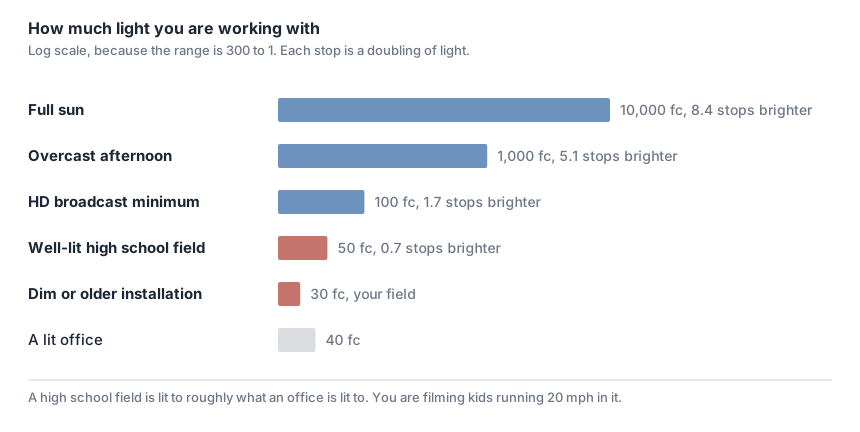
Flickering lights?
Older stadium lights actually produce light by flickering: they run off AC current and pulse brighter then dim 120 times per second. In the next section we'll describe how a camera works and why flicker might cause you to experience flickering brightness, shifting colors and moving dark bands across frame while the video plays at normal speeds. Pausing and stepping through frames you'd see very dark frames interspersed with well lit ones. Newer stadium lighting systems are LED and convert the AC power source to DC before producing light. Done well, this eliminates the pulsing entirely. Stadium grade LED systems are specifically built this way, partly because broadcast cameras are even more sensitive to flicker than your eyes are. So this problem largely goes away, but it still depends on the quality of the system.
How digital video cameras work
A video camera, whether it's a handheld camcorder or the phone in your pocket, works by letting light pass through a lens and land on a sensor. The sensor converts that light into an electronic signal. A shutter controls how long the sensor is allowed to collect light before the camera reads it out. This happens many times every second, and each capture becomes a single frame. Play the frames fast enough in succession and you have video.
Frame rate is how many frames you get each second. Shutter speed is how long each one stays open. A frame can't stay open longer than the gap between frames, so 30fps allows a shutter as slow as 1/30, and 60fps allows nothing slower than 1/60.
That is also why pulsing lights show up on film. Each frame is a separate sample of the light, so if one exposure covers four whole pulses it gets a full helping, and if the next lands across three and a half, that frame comes out darker. Most sensors also read out one row at a time rather than all at once, so a single frame can catch the light near its peak at the top and near its trough at the bottom. That's the dark band.
Larger sensors gather more light, because there is more surface area collecting photons during the same exposure. At the same resolution a bigger sensor also has bigger individual pixels, and bigger pixels each collect more. A modern phone camera has a sensor a fraction the size of the one in a dedicated video camera. Phones make up the difference in software, merging multiple frames, subtracting noise, and applying AI processing to get results the sensor alone couldn't produce. This works well for normal speed video, but breaks down in slow motion, since slow motion forces very short exposures that software can't fully compensate for.
Get your shutter to 1/120
If your lights pulse, your exposure has to cover a whole number of pulses. 1/120 is one pulse, 1/60 is two, 1/30 is four.
That works because an exposure covering a whole cycle collects the same light no matter when it starts. Open at a peak or open at a trough, you still get one complete rise and fall before the shutter closes, so every frame comes out the same brightness.
Anything else is luck. A 1/250 exposure is shorter than a single pulse, so it catches whichever slice of the cycle it happens to land on. A 1/100 exposure covers one and a fifth pulses, and that extra fifth lands somewhere different each time. Your camera's clock and the power company's aren't locked together, so where you land walks slowly, which is why bad night film throbs over a second or two rather than stuttering frame to frame. The arc's color shifts through the cycle as well, so the tint drifts along with the brightness.
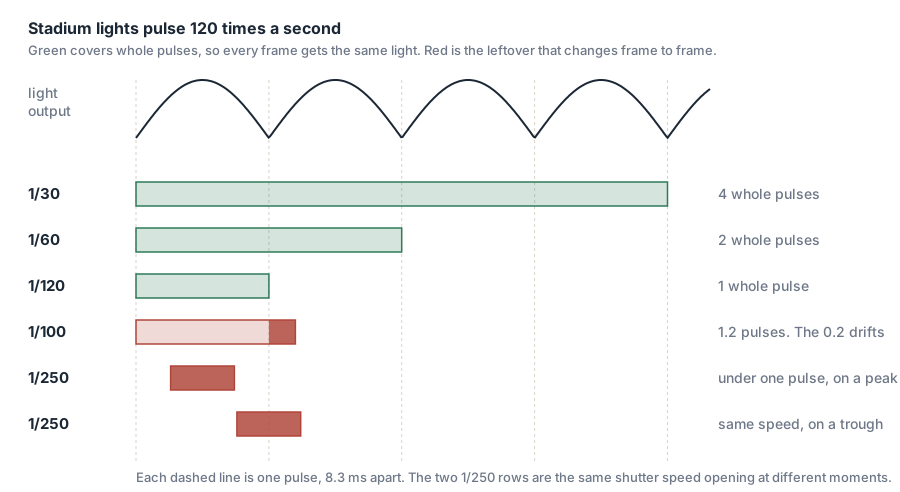
That leaves three speeds, and the slower ones blur. The sensor collects light the whole time the shutter is open, so if a player moves during that window his image lands on one set of pixels at the start and a different set by the end. What gets recorded is every position he passed through, stacked on top of each other. The longer the shutter stays open, the further he travels, and the wider he gets smeared.
A back running 15 miles an hour covers 22 feet every second, so during a 1/30 exposure he travels about nine inches, at 1/60 four and a half, at 1/120 a little over two. NFHS requires numbers at least 10 inches high on the back of a jersey, so 1/30 smears a running player across nearly a whole number, 1/60 across half of one, and 1/120 across a fifth.
That is the entire difference between 1/120 and 1/60. Both are safe under pulsing lights. 1/60 buys you one more stop of light and costs you twice the smear. So start at 1/120, raise gain when you need more light, and only drop to 1/60 once gain has run out. Gain costs you noise, and a number is still readable under noise.
On a camcorder you set 1/120 directly. Frame rate then has nothing to do with your exposure, so choose 30fps and halve your file sizes.
On a phone you can't set the shutter, but the frame rate puts a floor under it. At 60fps the camera can't hold a frame open longer than 1/60, so it can't drag the shutter down to 1/30 and smear a running back. Under stadium lights it will usually sit right at that floor anyway, because it needs the light, and 1/60 is one of the three safe speeds.
If your field is dark enough that 60fps still leaves you noisy, drop to 30fps. That lets the camera go as slow as 1/30, two stops brighter than 1/120 and also on the safe list. You pay for it in blur.
What to set on a camcorder
Get out of full auto first. On most consumer camcorders that is a mode dial or a Manual button, though some bury it under a menu item called Manual Settings or P/A/S/M. Nothing below is reachable until you do.
- Shutter: 1/120. If your lights don't pulse, 1/100 or 1/125 are equally fine. If they do, use 1/120 exactly.
- Find Auto Slow Shutter and turn it off. Look for Auto Slow Shutter, A.SLOW SHTR, or Low Lux. Not every camcorder has it, but Sony and Panasonic both ship it turned on where it exists. What it does is override the shutter speed you just set whenever the scene gets dark, dragging it down toward 1/30 to brighten the picture. If you set 1/120 and your film still smears, this is the first thing to check.
- Raise gain until you can read numbers. Gain is measured in decibels on a camcorder rather than ISO, and +6dB is one stop. Zoom in on a white jersey at the far hash, raise gain until the number is legible, then stop. Judge it on a paused frame rather than the live view, because the live view is smoothed and shows less noise than the recording actually has.
- White balance: manual, off something white. Stadium light is a strange color and metal halide in particular reads green. On auto the camera re-guesses it every time you pan, so the color drifts through the game and jerseys change shade between plays. Set it once off a white jersey or a white card and leave it alone.
- Focus: manual, set on the far hash. Autofocus needs contrast and at night there isn't much, so it hunts. A hunt in the middle of a play costs you the play. Set focus manually at the distance you will actually be shooting. Depth of field on a small sensor at these distances is deep enough to cover the field.
- Recording format: the highest bitrate offered. See below for what that costs you in storage.
What to set on a phone
You have far fewer knobs, and mostly that's fine, because a modern phone's automatic exposure is good. The problem is that it doesn't know what you are filming for.
Turn the phone sideways before anything else. Vertical film is useless for studying a formation.
- Resolution and frame rate: 4K at 60fps. On an iPhone that's Settings, Camera, Record Video. On Samsung it's the gear icon inside the camera app. The 60 is the shutter cap from above.
- HDR video off. Same screen on iOS. It produces files that look wrong outside Apple's ecosystem and complicates everything downstream.
- Lock exposure once, at kickoff. Press and hold on the screen until AE/AF LOCK appears, with a lit player near midfield under your finger rather than the turf or the lights. Without this the phone re-meters every time you pan and the whole picture brightens and darkens as you follow the ball. This is a once-a-game step rather than a once-a-play one: the lock holds across as many separate clips as you record, and only releases if you tap the screen again or leave the Camera app, so set it again if you closed the app at halftime. It locks focus along with exposure, which also stops the phone hunting mid-play. While it's locked you can drag up or down on the screen to fine-tune the brightness, and turning on Settings, Camera, Preserve Settings, Exposure Adjustment keeps that fine-tuning from resetting every time the app opens.
- Don't zoom past your phone's real lenses. Beyond that point you're into digital zoom, which just crops the picture and enlarges what's left, and at night that enlarges the grain along with everything else. On most phones 2x is still a crop of the main sensor, and the longer lens doesn't take over until 4x or 5x.
- Check for a Pro Video mode. Samsung's Galaxy line ships one in the stock camera app with a real shutter control, which means you can set 1/120 directly and treat the phone like a camcorder. iPhones do not have this in the stock app at any setting.
If you have done all of this and contact is still smearing, that is as far as a phone goes, and a camcorder with a real shutter control is the next step.
Bitrate, and what it costs you
Bitrate is how much data the camera spends every second describing the picture. Resolution is how many pixels you get; bitrate is how much detail it can afford to keep inside them.
Grainy footage is expensive to compress. The grain shifts randomly from frame to frame, so the encoder cannot predict it and has to spend real data on it. Starve it and it discards small high-contrast detail first, which is exactly what a jersey number is. That is why numbers can be crisp in a day game and mush under lights on the same camera.
Megabits per second ÷ 8 = megabytes per second. × 3,600 = megabytes per hour.
So 100 Mbps is about 45 GB an hour. 60 Mbps is 27. 24 Mbps is about 11. A camcorder left on its highest setting through a two and a half hour game hands you well over 100 GB, and you still have to get that off the card and uploaded before it is any use to anyone.
For comparison, an iPhone at 4K30 writes roughly 170 MB a minute, about 23 Mbps. At 4K60 it is closer to 400 MB a minute. So a camcorder in its 100 Mbps mode is spending four times what the phone does on the same size picture.
Bitrate does stop paying eventually. Once it is high enough to capture everything the sensor is really resolving, raising it further just inflates the file. At night, with grain in the picture, you reach that point later than you would in daylight, so if you pushed gain up, push bitrate up with it.
Buying a video camera
Given the settings discussed above, here's what to look for if you're in the market for a video camera for night games. Work out where you'll be standing first, because it decides which of these binds you: from the top of the stands you need reach before anything else, and from the sideline you need low light performance before anything else.
| What to look for | Why it matters | Where to check on a product page |
|---|---|---|
| Large sensor | How much light you gather before gain has to make up the difference. A bigger sensor lets you hold 1/120 with less grain | A spec row labeled "Sensor Size" or "Sensor Type." Full-frame and APS-C are large, 1" is mid-size, a fraction like 1/2.3" is small. Ignore "4K" or megapixel claims, they're unrelated to sensor size |
| Zoom range | How much of the frame a player on the far hash actually fills. A big sensor behind a short lens gets you a clean wide shot with no readable numbers in it | A range in millimeters ("29 to 348mm equivalent") or an optical zoom multiplier. Ignore digital or "intelligent" zoom entirely, it's a crop of what you already had |
| Manual gain (dB), shutter speed, and fps | Without these you cannot do anything in this article | A spec row showing a numeric range for gain/ISO or shutter speed (e.g. "100 to 25,600" or "1/10000 to 1/6 sec"). A stated range means it's adjustable. Physical control rings for focus/zoom/iris are a good sign too |
| Auto Slow Shutter that can be switched off | If it can't be disabled it will override your shutter every time the field gets dark | Usually only in the manual, under Auto Slow Shutter or Low Lux. If the manual doesn't say it can be turned off, assume it can't |
| Fast, reliable autofocus | Matters more at night, when there's less contrast for the system to track by. Useful even if you plan to focus manually | Feature bullets naming a specific autofocus system (e.g. "Dual Pixel AF," "real-time tracking") rather than a generic "autofocus" mention |
| In-body stabilization | Useful for handheld sideline shooting, though a tripod beats it for game film | Feature bullets or spec row mentioning "IBIS," "gimbal," "SteadyShot," or a stabilization rating in stops |
General rule of thumb: if a spec isn't mentioned anywhere, in the bullets, the main spec table, or the expandable details, assume the camera doesn't have it. Manufacturers reliably highlight features that make the camera look good.
Nothing in this table has been tested by us. It's a list of what to look for, not a recommendation of specific bodies.
If your film looks wrong, start here
| Symptom | Cause | Fix |
|---|---|---|
| Players smear when they run | Shutter too slow | 1/120 on a camcorder. On a phone, switch to 60fps so it can't drop below 1/60 |
| You set 1/120 and they still smear | Auto Slow Shutter is overriding you | Turn it off in the menu. On Sony and Panasonic it's on by default |
| The whole picture pulses brighter and darker | Your exposure isn't covering whole light pulses | Use 1/120, 1/60 or 1/30. Nothing in between |
| Dark bands crawling through the frame | Same cause, showing up as rolling shutter | Same fix |
| Picture brightens and darkens as you pan | Auto exposure re-metering on whatever's in frame | Phone: press and hold for AE/AF LOCK. Camcorder: you're still in auto, get out of it |
| Color shifts through the game | Auto white balance re-guessing the light | Set white balance manually off something white |
| The camera hunts focus mid-play | Autofocus can't find contrast in low light | Manual focus, set on the far hash |
| Numbers readable in day games, mush at night | Grain is eating your bitrate | Raise the recording bitrate, and don't push gain higher than you need to |
| Sharp, but too dark to see anything | You've run out of light at 1/120 | Raise gain. If gain is maxed out, 1/60 is your next flicker-safe step |
Quick takeaways
Get your shutter to 1/120. On a camcorder you set it directly, switch off Auto Slow Shutter so it stays set, and shoot 30fps because frame rate no longer affects your exposure. On a phone you can't set it, so you shoot 4K60 to stop the camera dragging the shutter below 1/60, and you lock exposure once at kickoff.
Spend grain, not blur. A noisy frame with a readable number beats a clean frame with a smeared one, because you are filming this to study rather than to watch.